PRIMARIES
Lift · Gamma · Gain
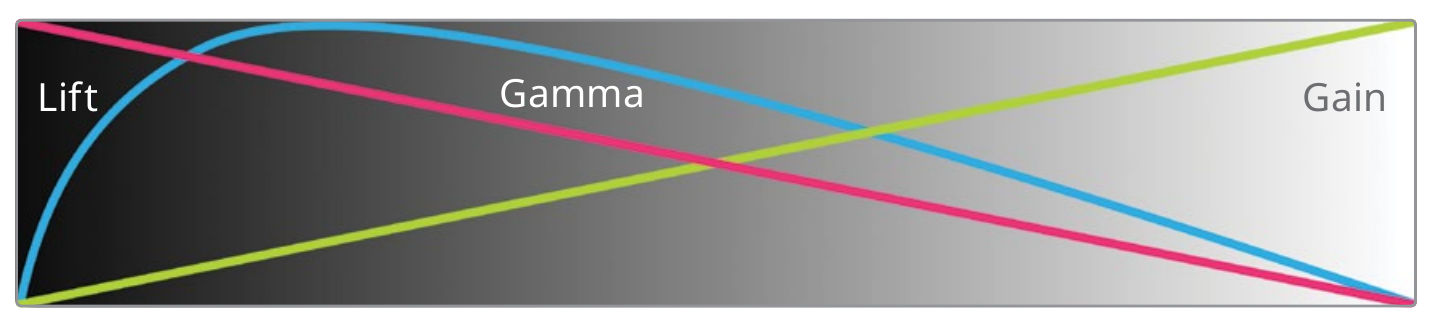
- Broad, overlapping tonal influence.
- Fast for global balance and image-wide relationships.
- Gain can affect highlights, midtones, and some darker values; the ranges are not hard partitions.
A node tree is not decoration. It is a record of decisions: which tool acts first, what each operation receives, and how the grade can be revised without confusion.
THE LOGIC LOOP
THE RULE One clear decision should lead to the next.
Both palettes can balance an image. The useful question is not which tool is better—it is how broadly you want the move to spread through the tonal range.
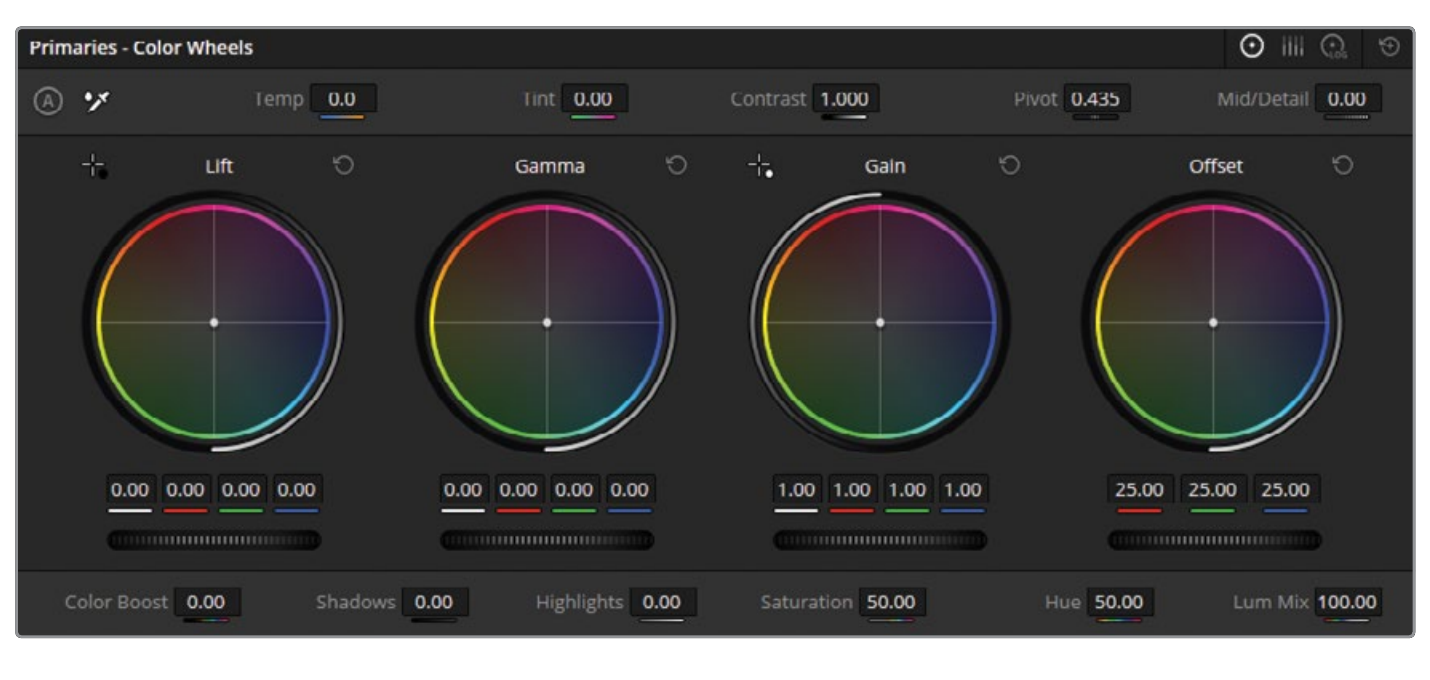
Linear-light thinking makes the foundation easier to reason about: exposure is a ratio, white balance is a channel relationship, and Lum Mix changes how the primary controls preserve luminance while changing color.
A one-stop increase doubles linear light; a one-stop decrease halves it. Exposure changes the signal proportionally.
Temperature and tint rebalance channel relationships. Correct an unwanted cast while preserving intentional warm or cool lighting.
In the Primaries palette, Lum Mix changes how RGB and luminance components are blended. At 100, Y-channel Lift, Gamma, and Gain adjustments can change brightness without altering color saturation; lower values allow more direct RGB interaction.
DO NOT TREAT LUM MIX AS A LOOK KNOB. It changes the behavior of primary adjustments. Set it deliberately and understand why the same wheel move may respond differently.
Source: Blackmagic Design, Primary Adjustment Controls and Luminance MixResolve has a fixed internal order for tools used inside one corrector node. Your node tree creates a second, visible order: every serial node receives the result of the node before it.
Moving controls around the interface does not change this internal processing sequence.
Separate nodes make the sequence visible, adjustable, and easier to diagnose.
SAME CONTROLS, DIFFERENT RESULT. If a later operation depends on values created earlier, changing the order changes what that later operation receives.
Source: The Colorist Guide to DaVinci Resolve 20, Operations Within Corrector NodesA balanced base is technically coherent and emotionally faithful. It removes unintended problems without flattening the scene's time of day, lighting direction, or color bias.
Confirm the source transform and working space before judging the image.
Place the subject and the scene's overall light level.
Remove unwanted channel bias without erasing the intended lighting.
Shape separation, density, and the tonal relationship around the subject.
Set color intensity after the tonal structure is coherent.
Check scopes, faces, neutrals, adjacent shots, and playback.
A repeatable structure keeps technical transforms, broad balancing, tonal design, and the output transform in a predictable order. The exact number of nodes matters less than clear responsibilities.
NAME THE JOBNode labels should describe the operation, not the history of your experimentation.
KEEP CAUSE VISIBLESeparate operations when doing so makes cause and effect easier to read.
REPEAT THE LOGICUse the same structure across a scene so matching does not become archaeology.
Use one representative shot. Make each operation deliberately, then change the order to see which relationships move downstream.
THE TESTCan another colorist read the tree and predict what will happen when a node changes?
END OF CLASS
01LGG makes broad, overlapping tonal adjustments.
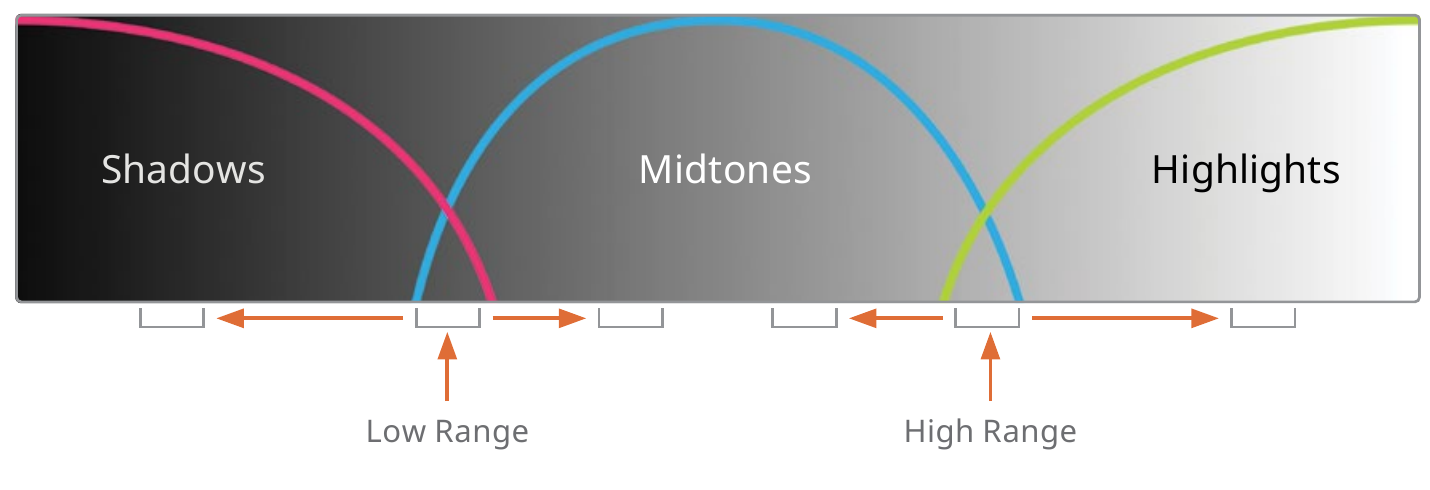
02Log controls target narrower tonal zones with adjustable ranges.
03Exposure and white balance establish the linear foundation.
04Lum Mix changes how primary adjustments balance color and luminance behavior.
05Tool order inside a node is fixed; serial node order is yours.
06A clean node tree makes the grade repeatable.
DaVinci Resolve is a trademark of Blackmagic Design. This course reference is not an official Blackmagic Design publication.