Practical brightness structure: exposure, black point, white point, and contrast.
01Scopes vs perception
Measure the signal.
Interpret the image.
Scopes show what the image signal is doing. Your eyes, the viewing context, and the visual intent tell you what that information means.
FREE + STUDIOCLASS 3 • HANDS-ON
THREE PART DECISION
01LOOKWhat does the image feel like?
02MEASUREWhat does the signal confirm?
03ADJUSTWhat change supports the intent?
THE RULE Scopes are evidence—not taste.
02Signal anatomy
Luminance gives shape. Chrominance gives color.
Separating brightness information from color information helps you choose the right scope and understand what it can—and cannot—tell you.
Color direction and intensity, considered separately from the image's luma structure.
PERCEPTION IS NOT A READOUT. Two equal signal values can feel different because of surrounding color, contrast, adaptation, and display conditions.
Source: Resolve 20.3 Reference Manual, pp. 3039–304103Scope map
Choose the question. Then choose the scope.
Each scope reorganizes the same image signal to answer a different kind of question.
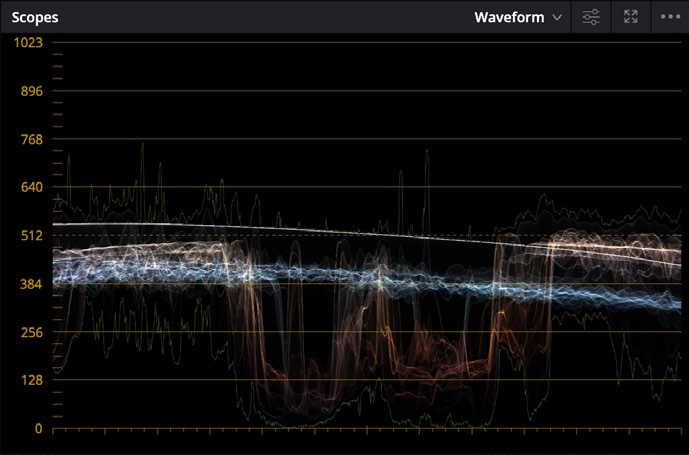
WAVEFORMLuminance + image position
Left-to-right follows the frame. Vertical height shows signal level.
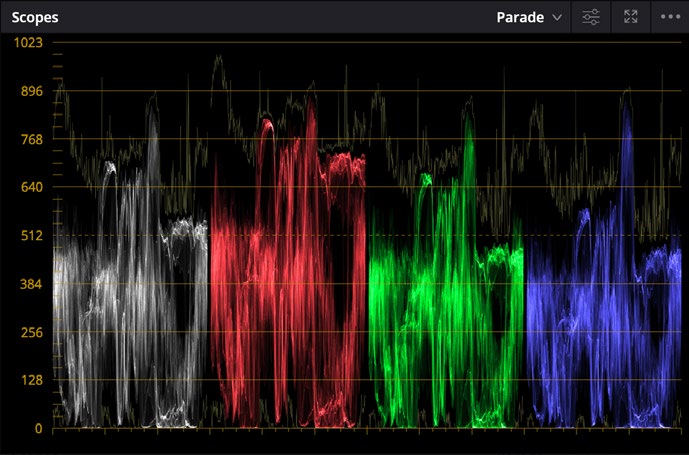
PARADEChannel balance + contrast
Red, green, and blue traces make channel differences easier to compare.
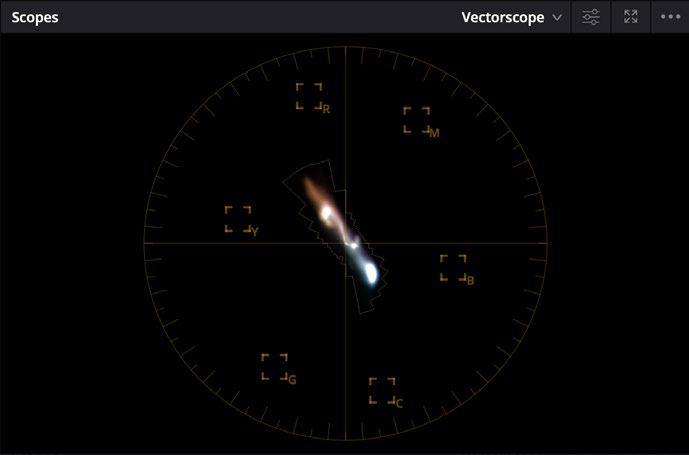
VECTORSCOPEHue + saturation
Angle suggests hue. Distance from center suggests saturation.
01Where are the dark and bright values?
02Are channels balanced—or intentionally different?
03Which hues dominate, and how saturated are they?
04Waveform
The frame is horizontal. Signal level is vertical.
A Waveform helps connect parts of the picture to their tonal position without losing left-to-right image geography.
TOPBrighter signal values
MIDDLEMidtone distribution
BOTTOMDarker signal values
CAUTIONLow does not automatically mean wrong. High does not automatically mean clipped.
05RGB Parade
Compare channels without forcing them to match.
Parade separates red, green, and blue so you can locate color casts and compare channel behavior in shadows, midtones, and highlights.
RGB
DON'T GRADE THE STORY OUT. A sunset should not become neutral just because the red trace sits higher. Balance is a visual decision, not identical channels.
Source: Beginner's Guide, Parade scope exercise Source: Resolve 20.3 Reference Manual, Parade06Vectorscope
Angle is hue. Distance is saturation.
The center represents little or no saturation. As the trace stretches outward, saturation increases in the direction of the corresponding hue.
CENTERLess saturated
OUTWARDMore saturated
ANGLEHue direction
The skin-tone guide is a reference angle—not a target every face must sit on.
07Primary controls
Lift, Gamma, Gain—and Offset.
These controls divide the tonal range by influence, but the regions overlap. Expect to move back and forth as one adjustment affects the others.
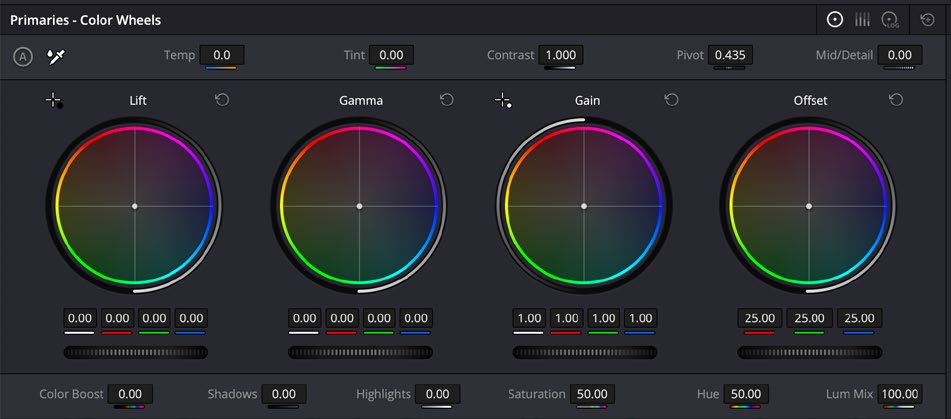
Works from the black point upward, with broad influence that fades toward white.
Redistributes the midtones while mostly preserving the black and white points.
Works from the white point downward, with broad influence that fades toward black.
Moves overall lightness or color balance across the entire tonal range.
THINK IN INFLUENCE, NOT BOXES. Lift, Gamma, and Gain are not narrow shadow, midtone, and highlight selections. Their tonal ranges overlap broadly.
Source: Beginner's Guide, Lift/Gamma/Gain exercise Source: Resolve 20.3 Reference Manual, pp. 3091–309408Hands-on loop
Move one control. Watch three things.
The fastest way to connect control behavior to the image is to make a deliberate change, observe it, reset it, and repeat.
01VIEWER
→What changed in the image?
02SCOPE
→How did the trace move?
03FEELING
→Did the emotional read change?
04RESET
Return to neutral and try again.
LIFT ↓Darker black point, denser shadows, stronger weight.
GAMMA ↔Midtone redistribution, changed face and subject presence.
GAIN ↑Brighter white point, greater highlight separation.
OFFSET ↕Whole image shifts together in lightness or color balance.
09Visual intent
Contrast is emotional structure.
Contrast controls separation, weight, clarity, and attention. The same technically valid signal can feel delicate, harsh, distant, immediate, open, or trapped.
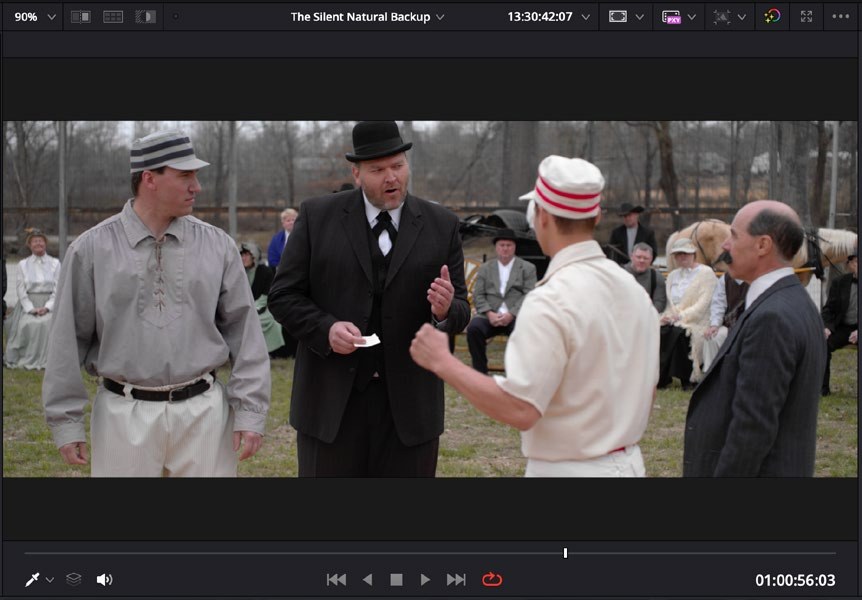
01Where does your eye go first?
02What feels heavy—or light?
03Does the contrast support the story?
BEFORE THE CONTROLSay how you want it to feel. Then use the scopes to help you build that feeling deliberately.
10
END OF CLASS
NO ASSIGNMENT DUE
Homework: play with LGG while looking at scopes.
01Choose one shot.Keep the image familiar so the control behavior is easier to notice.
02Open Waveform, Parade, or Vectorscope.Know which question the selected scope can answer.
03Push Lift, Gamma, Gain, and Offset one at a time.Go too far on purpose, observe, then reset.
04Describe the feeling.Connect the signal change to the emotional result—not just the numbers.
Sources + image credits
Interface images are educational excerpts from official Blackmagic Design training and reference materials.
The Beginner's Guide to DaVinci Resolve 20 ↗DaVinci Resolve 20.3 Reference Manual ↗DaVinci Resolve is a trademark of Blackmagic Design. This course reference is not an official Blackmagic Design publication.